
Guide

Set up GrabIt
with EasyUsenet.

GrabIt is a long-standing Windows client for anyone who wants to decide for themselves what gets downloaded. More control, but less automation than SABnzbd.

Guides · GrabIt
For users with their own ideas. GrabIt can search newsgroups directly and download individual articles selectively. If you just want to work through NZB files, SABnzbd is faster.
1

Install GrabIt

Download GrabIt from the vendor's site and install it. The free version is entirely sufficient to start with.

  • Windows 10 or 11
  • About 50 MB of free disk space
  • No extra software needed
2

Enter the server details

Open Options → Servers and create a new server. Enter our details and switch on TLS/SSL. Your username and password are in your order e-mail.
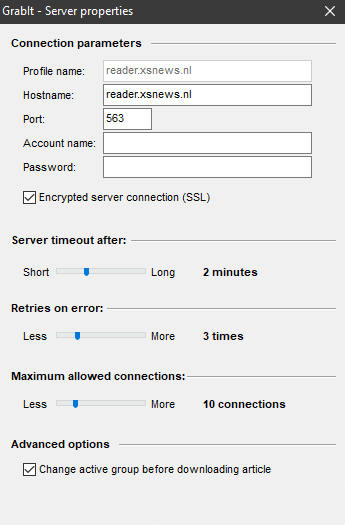
GrabIt: EasyUsenet server details entered
Server dataEasyUsenet
Serverreader.easyusenet.nl
Port563Enable TLS/SSL
connections100
Usernamefrom your e-mail
Passwordfrom your e-mail
3

Check the connection

GrabIt shows the connection status in the bar at the bottom. If a connection is listed there, everything is entered correctly.

No connection? Check Port 563 with TLS/SSL and whether the connection count is set to 100. If it persists, write to us.
4

Load newsgroups

Via Refresh groups GrabIt fetches the list of available newsgroups. Subscribe to the ones that interest you – only then can you search in them.

  • The list is large; the first fetch takes a while
  • Only subscribed groups are searched
  • Headers can be limited by date
5

Download or open an NZB

You can queue articles straight from a group or load an NZB file via File → Open NZB . With GrabIt you normally do the unpacking yourself.

No access yet?

Unlimited Usenet from €3.98 a month – full performance in every plan.

See all plans →
FAQ

Questions about GrabIt

What we are asked most about this guide.

Is GrabIt free?
There is a free version that is enough for normal use, plus a paid one with extra features. Your Usenet access is paid separately, with us.
Does GrabIt run on macOS or Linux?
No, GrabIt is a Windows-only program. For other systems take SABnzbd or NZBGet.
Why GrabIt and not SABnzbd?
Because it lets you search newsgroups yourself and download individual articles selectively. If you only work through NZB files, SABnzbd is considerably faster.
Does GrabIt unpack automatically?
Only to a limited extent. As a rule you unpack finished downloads yourself – that is the price of the greater control.
Which port should I use?
563 with TLS/SSL switched on. That encrypts the connection, at no extra cost.
How many connections should I set?
100 – that is our maximum, and it is included in every plan.
Setup is not working – what now?
Write to our support team and we will set it up with you.
Get in touch →