
Set up SABnzbd
with EasyUsenet.
SABnzbd is the standard in the Usenet community: open source, free and at home on practically any device. It runs in the browser and downloads, repairs and unpacks automatically.
Install SABnzbd
Download the version for your system from the official site and install it like any other program. On a NAS you will find SABnzbd in the respective package centre – on Synology, for instance, through the community sources.
- Windows, macOS, Linux, Synology, QNAP, Unraid, Raspberry Pi
- About 150 MB of free disk space
- A browser – nothing more is needed
Start the setup wizard
On first launch the wizard opens in the browser. Choose your language and click Next until you reach the server details.
Enter the server details
Enter our details and tick TLS/SSL. Your username and password are in the e-mail you received after ordering.
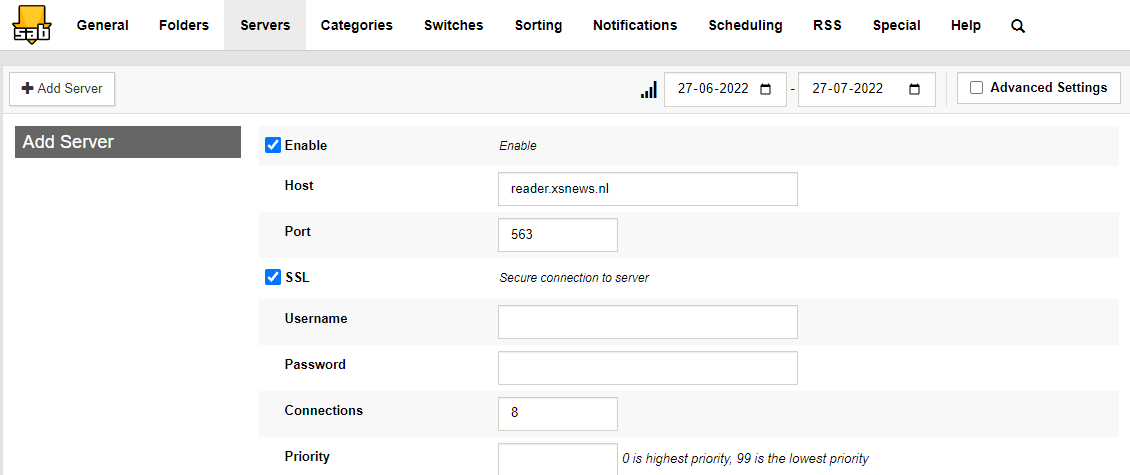
Test the connection
Click Test Server. If “Connection successful” appears, everything is in place. Then finish the wizard and you land on the overview.
Set the folders
Under Settings → Folders you set where finished downloads go. A temporary folder on a fast disk and a target folder on the large drive is the usual split.
- Incomplete downloads: fast SSD
- Finished downloads: large drive
- Both folders should be on the same machine
Start your first download
Drag an NZB file into the browser window or upload it via Add NZB. SABnzbd downloads across all 100 connections in parallel, verifies the data, repairs it where needed and unpacks automatically at the end.
No access yet?
Unlimited Usenet from €3.98 a month – full performance in every plan.
Questions about SABnzbd
What we are asked most about this guide.