
Set up Spotnet
with EasyUsenet.
Spotnet is the shortest route to your first download: search and newsreader in one program, completely free. Five steps and it is running.
Download Spotnet
Download the archive from the official site and unpack it into a folder of your choice – for example C:\Spotnet. There is no installation in the classic sense: Spotnet runs straight from the folder.
- Windows 10 or 11, 64-bit
- An unpacker for RAR archives
- About 200 MB of free disk space
Start Spotnet
Start Spotnet.exe. On first launch Windows may ask for confirmation – that is normal, because the program is not signed. The setup wizard then opens.
Enter the server details
In the wizard, choose Custom Usenet provider and enter our details. Your username and password are in the e-mail you received after ordering.
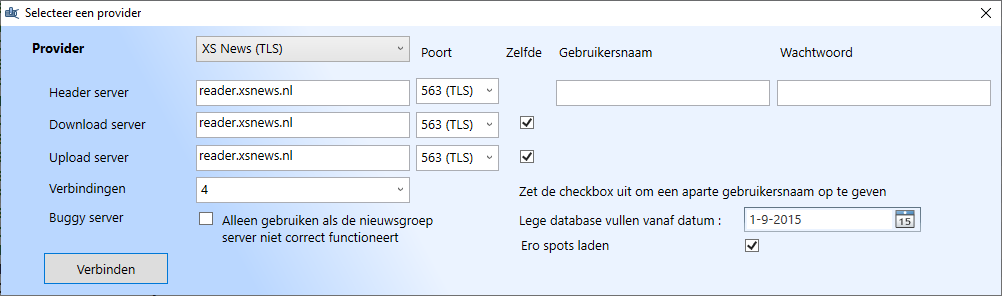
Check the connection
Click Testen. If a success message appears, the connection is up. If not, check the port and the TLS/SSL tick box first – those are the most common stumbling blocks.
Search and download
Spotnet brings its own index: you search directly in the program, click an entry and the download starts. Spotnet repairs and unpacks automatically.
- Search using the bar at the top of the window
- Filters for categories and time period in the sidebar
- Target folder under Settings → Download set
No access yet?
Unlimited Usenet from €3.98 a month – full performance in every plan.
Questions about Spotnet
What we are asked most about this guide.